







A packaging specification can be perfectly accurate and still create problems if the artwork built from it is outdated. That’s the gap many food and beverage teams face today.
Product specifications live in one system. Packaging components live somewhere else. Artwork moves through email, spreadsheets, shared folders, or a separate approval platform. Each team may have its own version of the truth, but the finished package needs all of those truths to agree.
That’s where packaging artwork approval becomes more than a final checkpoint. It becomes a critical part of the connected product lifecycle.
With TraceGains Packaging Specification Management and Esko WebCenter Go, brands can connect product and packaging specifications to the artwork approval process, giving teams greater visibility and control from specification to shelf.
Why does packaging artwork approval matter?
Artwork is where product information becomes something consumers, and regulators, can actually see.
Ingredient declarations, allergens, claims, nutrition information, product names, barcodes, and other critical information all have to make it onto the right package in the right version.
But the information behind that artwork is constantly changing.
A formula changes.
An ingredient changes.
A claim changes.
A packaging component changes.
A market requires a different label.
When those changes happen in disconnected systems, someone has to remember to tell everyone else. That’s where manual handoffs create risk.
An email can be missed. A spreadsheet can contain an outdated version. An artwork project can continue moving forward even though the underlying product specification has changed. The result can be more review cycles, launch delays, reprints, or compliance risk.
How do you connect packaging specifications to artwork?
The answer is to link the two workflows rather than treating them as separate processes.
TraceGains Packaging Specification Management creates the product and packaging context: formulas, ingredients, packaging components, assemblies, and finished goods. WebCenter Go brings that context into the artwork workflow, connecting finished goods in TraceGains with artwork projects in Esko.
This creates a more continuous path: Formula → Packaging Specs → Finished Good → Artwork → Approval
Instead of asking teams to manually bridge each step, the relationship between the product and its packaging artwork becomes part of the digital lifecycle.
What does a connected packaging artwork workflow look like?
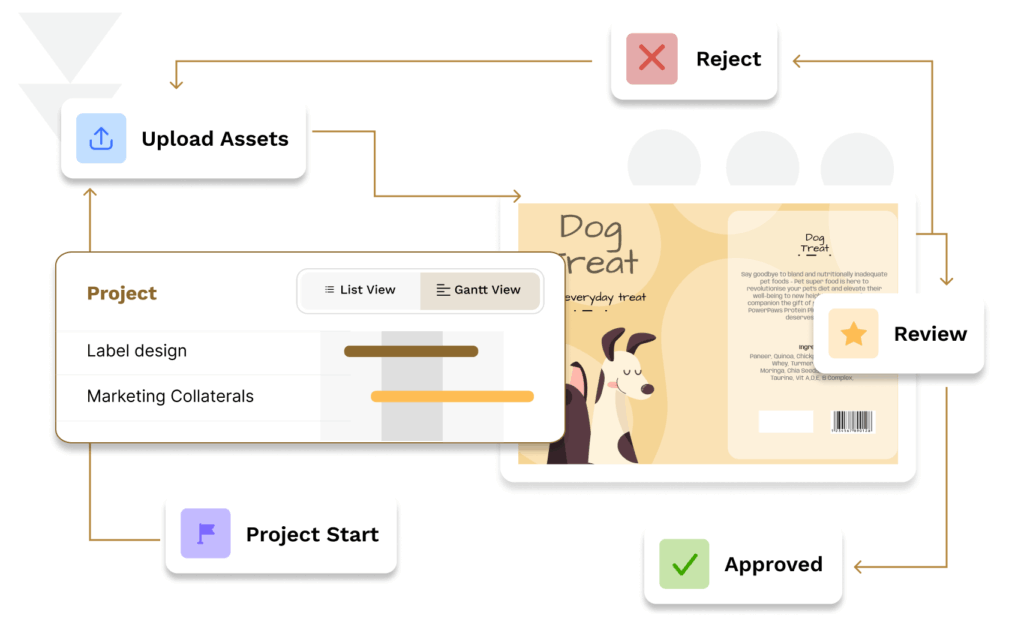
Imagine a finished good that includes a specific formula, bottle, carton, and label. That finished good can be connected to its corresponding artwork project in WebCenter Go. From within TraceGains, teams can see whether associated artwork is approved or still moving through its workflow. That visibility changes the conversation.
Instead of asking, “Did Packaging approve the artwork?” teams can see the status.
Instead of wondering, “Which artwork version are we using?” the artwork project remains connected to the relevant product context.
And instead of discovering at the last minute that a product change requires artwork review, teams can flag the change for review and approval. That’s the difference between tracking artwork and connecting artwork to the product lifecycle.
How does WebCenter Go improve packaging approvals?
WebCenter Go provides dedicated artwork management and approval capabilities, including workflow automation, online proofing, version comparison, checklists, and approval traceability.
Combined with TraceGains, teams can:
- Track artwork status alongside finished goods.
- Automate review workflows instead of coordinating through email.
- Compare versions to identify critical changes.
- Collaborate on proofs through structured approval workflows.
- Maintain an audit trail of comments, revisions, and approvals.
- Use AI-powered checks to identify potential issues before artwork reaches production.
The outcome is a more controlled path from approved product information to approved packaging artwork.
What happens when a product specification changes?
Consider a formula change that affects an allergen declaration. In a disconnected process, R&D or Regulatory updates the specification, then manually notifies Packaging. Packaging may notify the artwork team. The artwork gets revised, circulated, reviewed, and approved. Every handoff creates an opportunity for something to get lost.
With connected product and packaging specifications, the relationship to artwork is already established. Changes can be surfaced for review, helping teams understand when artwork needs attention and reducing the risk of specifications and artwork falling out of sync.
From packaging specs to approved artwork
Packaging Specification Management and WebCenter Go connect product, packaging, and artwork workflows that have traditionally operated in silos.
TraceGains brings product and packaging intelligence. Esko brings artwork workflow and approval expertise. Together, they help teams reduce manual handoffs, improve visibility, and keep product information aligned with approved artwork.
That’s what PackMan is about: connecting the pieces so packaging stays accurate as products evolve.
Ready to bring smarter artwork workflows into your connected product lifecycle? Explore AI-powered WebCenter Go.